Catégories
Nouveau blog
Mots clés
Fonction DTMF du haut-parleur IP Tonmind : déclenchez des fichiers audio et des URL HTTP via un téléphone SIP
August 11 , 2026Prise en charge des haut-parleurs IP TonmindCommande DTMF (Dual-Tone Multi-Frequency), offrant ainsi un moyen simple et flexible de déclencher des actions prédéfinies directement depuis un téléphone SIP externe ou un softphone.
Avec une application SIP telle queLinphoneLes utilisateurs peuvent passer un appel SIP vers une enceinte IP Tonmind et appuyer sur une touche prédéfinie du clavier. La commande DTMF correspondante permet alors de déclencher la lecture d'un fichier audio stocké sur l'enceinte IP ou d'exécuter une URL HTTP configurée.
Cette fonctionnalité facilite le contrôle audio à distance et l'intégration du système pour des applications telles que les écoles, les usines, les centres commerciaux, les hôpitaux, les immeubles de bureaux, les entrepôts et autres environnements de sonorisation publique.
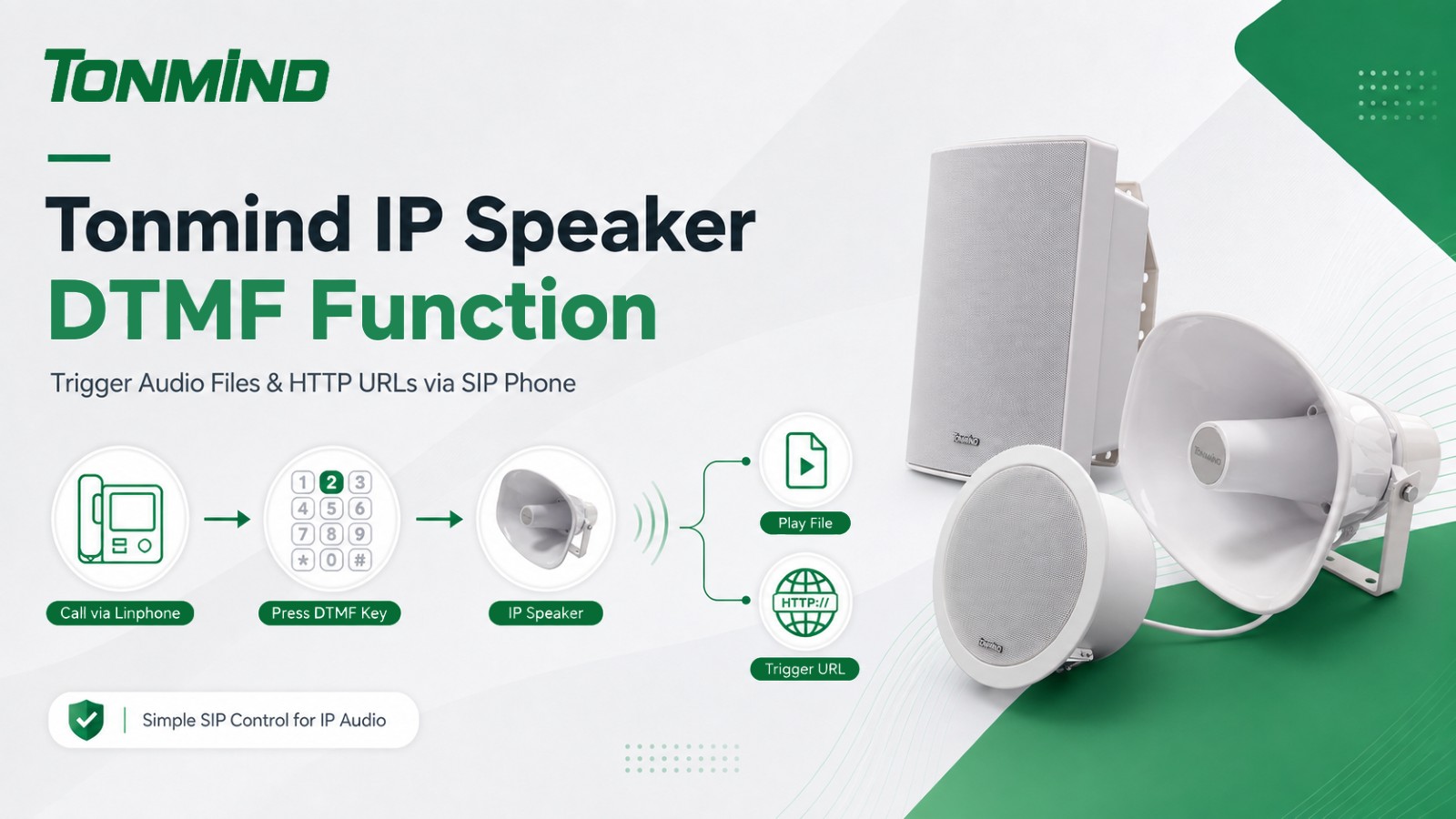
Comment fonctionne le contrôle DTMF ?
Le DTMF est la méthode de signalisation par clavier couramment utilisée lors de la saisie de chiffres pendant un appel téléphonique.
Avec les enceintes IP Tonmind, différents numéros de clavier peuvent être configurés comme commandes de déclenchement. Par exemple, le numéro2peut être configurée pour lire un fichier audio spécifique, déclencher une URL HTTP ou effectuer les deux actions.
Le processus de base est le suivant :
Téléphone SIP / Linphone → Appel SIP → Touche DTMF → Haut-parleur IP Tonmind → Fichier de déclenchement ou URL HTTP
Cela permet aux utilisateurs de contrôler des actions prédéfinies sans avoir à ouvrir de logiciel de gestion supplémentaire.
La configuration est simple et peut être effectuée via l'interface web de l'enceinte IP.
Connectez-vous à la page Web de l'enceinte IP Tonmind et accédez à :
Entrée d'alarme → DTMF
Saisissez le numéro DTMF que vous souhaitez utiliser.
Par exemple: DTMF : 2
Cela signifie que lorsque le haut-parleur reçoit le chiffre DTMF2Lors d'un appel SIP actif, il peut exécuter l'action configurée correspondante.
Si vous souhaitez que la commande DTMF déclenche un message audio enregistré, activez :
Activer le fichier
Sélectionnez ou configurez ensuite le fichier audio correspondant.
Par exemple, appuyer sur2pourrait diffuser un message préenregistré tel qu'une annonce d'urgence, des instructions d'évacuation, un avis de fermeture ou tout autre message audio personnalisé.
Les enceintes IP Tonmind peuvent également utiliser les commandes DTMF pour déclencher une URL HTTP.
Activer:
Activer l'URL
Saisissez ensuite l'URL HTTP requise.
Lorsque le numéro DTMF configuré est reçu, le haut-parleur IP envoie la requête HTTP correspondante.
Ceci est particulièrement utile lors de l'intégration du haut-parleur avec des systèmes d'alarme, des plateformes d'automatisation, des systèmes de contrôle d'accès, des systèmes de sécurité ou d'autres périphériques réseau.
Une fois la configuration terminée sur le haut-parleur IP, un téléphone SIP externe ou un softphone tel queLinphonepeut être utilisé pour activer la fonction.
L'opération est simple :
Ouvrez Linphone ou un autre téléphone SIP compatible.
Effectuez un appel SIP vers l'adresse IP ou l'adresse SIP du haut-parleur IP Tonmind.
Attendez que l'appel soit établi.
Ouvrez le clavier numérique.
Appuyez sur le numéro DTMF configuré, par exemple2.
Le haut-parleur IP reçoit la commande DTMF et exécute la tâche configurée.
SiActiver le fichierSi la fonction est activée, le fichier audio correspondant sera lu.
SiActiver l'URLUne fois activée, l'URL HTTP configurée sera déclenchée.
Cela offre un moyen pratique d'activer à distance différentes fonctions via un flux de communication SIP standard.
Différents numéros DTMF peuvent être attribués à différentes actions en fonction des exigences du projet.
Par exemple:
Appuyez sur 1 :Diffuser un message de bienvenue
Appuyez sur 2 :Diffuser une annonce d'urgence
Appuyez sur 3 :Déclencher une URL HTTP
Appuyez sur 4 :Activer un autre message audio prédéfini ou une tâche d'automatisation
En configurant différentes commandes du clavier, les utilisateurs peuvent créer un système de télécommande simple pour la messagerie quotidienne, les notifications d'urgence, l'intégration de la sécurité et l'automatisation.
Les opérateurs peuvent déclencher des alertes de sécurité, des notifications de production, des annonces de changement d'équipe ou des commandes HTTP depuis une salle de contrôle sans avoir à accéder manuellement à chaque haut-parleur IP.
Les commandes DTMF peuvent être utilisées pour activer des messages promotionnels, des annonces de fermeture, des notifications d'urgence ou d'autres diffusions programmées et temporaires.
Le personnel autorisé peut rapidement déclencher des annonces prédéfinies ou intégrer le haut-parleur IP aux systèmes de communication et d'alarme existants.
Le DTMF peut être utilisé pour les notifications à l'échelle d'un bâtiment, les messages d'urgence, les alertes de sécurité et l'intégration avec les systèmes de contrôle d'accès ou d'automatisation des bâtiments.
La fonction DTMF offre plusieurs avantages pour les systèmes audio IP et de radiomessagerie :
Fonctionnement à distance simplevia un téléphone SIP ou un softphone
Déclenchement rapidedes fichiers audio préenregistrés
Prise en charge des URL HTTPpour l'intégration de systèmes tiers
Configuration flexiblepour différentes commandes du clavier
Aucun matériel de contrôle supplémentaire n'est requis.pour le déclenchement à distance de base
Convient aux applications de radiomessagerie quotidiennes et d'urgence
Intégration facile avec les systèmes de communication SIP existants
En combinantCommunication SIP, contrôle DTMF, lecture audio préenregistrée et déclenchement par URL HTTPLes haut-parleurs IP Tonmind offrent une solution flexible pour les systèmes modernes de radiomessagerie et de notification IP.
Les utilisateurs peuvent simplement passer un appel SIP depuis Linphone ou un autre téléphone SIP, appuyer sur un numéro de clavier configuré et déclencher à distance l'action requise sur le haut-parleur IP.
Qu’elle soit déployée dans les écoles, les usines, les centres commerciaux, les hôpitaux, les immeubles de bureaux ou d’autres environnements commerciaux et industriels, la fonction DTMF contribue à rendre les systèmes de radiomessagerie IP plus pratiques, plus réactifs et plus faciles à intégrer à l’infrastructure réseau existante.
Mots clés :